

7 Benefits of Working with a Local Google Ads Management Agency in Austin
Running a business in Austin is no small feat. Whether you’re a local contractor, a home service provider, or a niche startup, standing out online has never been more crucial—or more complicated. Google Ads can help. But managing your ad spend effectively? That’s where things can get tricky fast. With so many agencies promising results, it’s natural to wonder: Should you work with a national firm, or is a local Google Ads management agency the better bet? If you’re based in Austin, partnering with a local expert like EVpro Marketing offers distinct advantages you might not have considered. Let’s dive into the real, business-boosting reasons why working with an Austin-based Google Ads agency can make all the difference. 1. Local Market Knowledge You Can’t Google Here’s the thing: Even the smartest AI or national marketing team can’t replace real-life, boots-on-the-ground insights. A local agency understands how people in Austin search, what drives them to click, and how competition behaves in your specific area. Keywords that work in one city might flop in another. Local trends, seasonality, even event-driven spikes in traffic—these nuanced factors are easy to miss if you’re not familiar with the community. Whether it’s adjusting campaigns during SXSW tourism booms or targeting zip codes with specific demographics, a local team brings context to your campaigns that outsiders simply can’t. 2. In-Person Strategy Sessions (When You Want Them) Explaining your business goals over email is one thing. Sitting down face-to-face to map out a customized advertising strategy? That’s next-level clarity. When you’re working with a local Austin Google Ads agency, collaborating is easier. You can pop into their office to discuss campaign performance or workshop changes without scheduling endless virtual calls across time zones. EVpro Marketing, for example, is based right here in Austin—so you’re never a stranger trying to chase down support. That personal connection also builds trust and allows for better alignment between your vision and the agency’s execution. 3. Faster, More Transparent Communication Ever get stuck in endless email chains with an agency that’s three time zones away? Or worse, dealing with account managers who rotate every few months? Local agencies tend to be more agile. When issues come up—or when success needs to scale—there’s less red tape. You’re not a number; you’re a neighbor. Agencies like EVpro Marketing prioritize fast response times, personalized service, and open communication. This not only saves you headaches but also helps your campaigns pivot quickly when opportunities or challenges emerge. 4. Alignment with Other Austin-Based Marketing Efforts Your Google Ads shouldn’t exist in a silo. A strong campaign should complement your broader local marketing efforts—like SEO, social media, and even offline promotions. A local agency can synchronize your Google Ads strategy with your local SEO services to make sure you’re visible exactly when and where customers are searching. This creates a more consistent brand presence, which improves both click-through rates and trustworthiness. Whether you’re running seasonal promotions or aiming to dominate local maps listings through Google My Business optimization, a local agency ensures all parts of your digital presence are working toward the same goal. 5. Real-Time Strategy Adjustments Based on Local Events If a sudden storm drives service calls through the roof or a major festival impacts traffic and search trends, a local partner can help you react fast. Because they live and work where you do, local Google Ads pros have their fingers on the pulse of shifting consumer behavior. They can spot patterns early and help you adjust bidding strategies, ad copy, and promotions to match what’s happening right now in Austin. That kind of responsiveness can turn unexpected events into profitable opportunities. 6. Access to a Network of Local Resources Need a new landing page that aligns with your ads? Want local blogs or micro-influencers to boost visibility? A local agency has trusted contacts. Working with an Austin-based Google Ads management team often gives you access to a wide network of local creatives, developers, content writers, photographers, and even partnership opportunities with complementary businesses. EVpro Marketing, for instance, offers not just Google Ads strategy but full-service digital support—from custom web development to social media campaigns, all delivered by professionals who understand your market. 7. Results That Reflect Real ROI—Not Just Clicks At the end of the day, it’s not about impressions and fancy metrics. It’s about what those ads actually do for your bottom line. A good local agency doesn’t just show you data; they help you make sense of it. EVpro Marketing is a results-driven team that focuses on real KPIs—the kind that matter to business owners: Are you getting more qualified leads? Are those leads turning into sales? Is your cost-per-conversion improving? Because they’re local, they’re more invested in helping Austin businesses succeed long-term—not just churning through ad budgets month after month. Why Choose EVpro Marketing as Your Local Google Ads Partner? With a team holding certifications in Google Ads, Analytics, HubSpot Inbound, SEMrush, and Ahrefs SEO, EVpro Marketing offers more than just qualifications—they bring experience and a deep understanding of the Austin business climate. Their Google Ads campaign management approach focuses on what truly matters: earning you results through precise targeting, creative copywriting, and continuous optimization. Clients appreciate their transparency, detailed reporting, and commitment to keeping ad spend efficient and effective. You’re not just hiring a vendor. You’re adding a local expert to your marketing team. Conclusion: Think Globally, Advertise Locally Sure, you could go with a big national agency. But if you want campaigns that reflect local search behavior, meet community-specific needs, and support your entire digital strategy in Austin—going local gives you more control and clarity. Working with a reputable Google Ads management agency like EVpro Marketing helps your business attract more of the right customers—with insights rooted in where you actually operate. Looking to boost visibility, lower ad waste, and grow your revenue in Austin? Let’s chat. Or start by exploring our proven approach to Google Ads campaign management. Your next big lead could be one keyword away.
Avoid These 7 Costly Google Ads Campaign Mistakes That Drain Your Budget
Running a Google Ads campaign can feel like steering a high-speed train—when it works, it’s powerful. But when it doesn’t, you can burn through your budget without a single conversion to show for it. That frustration is one we hear about all the time at EVPro Marketing. Many intelligent advertisers find themselves scratching their heads, wondering why their ads aren’t converting or where their ad spend went. The truth is, even experienced marketers can fall prey to common Google Ads mistakes that quietly sabotage performance. Let’s break down the top Google Ads campaign mistakes to avoid, backed by expert advice to help you optimize your campaign, boost conversion, and get the better results you deserve. 1. Ignoring Campaign Structure: The Foundation of Success A poorly organized campaign structure can sabotage you from day one. Why Campaign Structure Matters When you launch an ad, Google uses your campaign structure to determine who sees the ad, when it shows, and why. A messy structure means irrelevant ads may appear, irrelevant clicks may drain your budget, and your conversion rate takes a nosedive. Best Practices to Structure Your Campaigns Group similar keywords into specific ad groups. Keep each ad group tight – with closely related keywords. Separate Search campaigns from Google Display Network campaigns. Match your campaign type to your goals – don’t mix brand awareness with lead generation in one campaign. Create clear naming conventions for campaigns so understanding performance is easy. Getting your campaign structure right doesn’t just optimize performance – it also ensures your ads reach the right audience with the right message. 2. Using Broad Match Keywords Without Control A promising keyword might appear helpful, but if it’s too broad, your ads can appear to people who are unlikely to convert. This is one of the most costly Google Ads mistakes to make—especially for businesses that rely on lead quality. What is Broad Match? Broad match means your ad can appear when someone searches related topics—not just your exact keyword. For example, if your keyword is “digital marketing strategy,” your ad might show for searches like “free marketing plans” or “marketing jobs”—not great if you’re selling services. How to Fix It Use Phrase Match or Exact Match for better targeting. Regularly review your search term reports to see what triggered your ads. Build a negative keyword list to block irrelevant traffic. Using the right match type helps prevent your ads from showing for irrelevant searches and helps optimize Google Ads campaign results. 3. Neglecting Negative Keywords This is one of the most common mistakes advertisers make and a huge reason campaigns underperform. What are Negative Keywords? Negative keywords are words or phrases you tell Google not to show your ads for. For example, if you sell high-end digital marketing services, you might want to block searches containing “cheap” or “free.” Negative Keyword Tips Use tools like Google’s Search Term Report to find and block poor matches. Add terms like “job,” “cheap,” or “free” as negative keywords if you’re not targeting those. Maintain a master negative keyword list across campaigns. This step alone can save you from throwing away money on Google Ads that bring in the wrong kind of traffic. 4. Poor Landing Page Experience Driving traffic is one thing. But if your landing page fails to engage visitors or creates friction, most will bounce before converting. Why Landing Pages Matter for Conversion Google monitors what happens after the click. If your landing page doesn’t match ad intent or provides a bad user experience, your quality score tanks—and cost per click goes up. Improve Your Landing Page Keep messaging consistent with your ad copy. Make pages load quickly (under 3 seconds). Remove distractions and clutter. Include a clear CTA (Call-to-Action). Ensure your form or offer works on mobile. Remember: The click isn’t the end game—the conversion is. A seamless user experience keeps people from abandoning your page after just one look. 5. Not Tracking Conversions Properly You can’t improve what you don’t measure. And conversion tracking is key to see what’s working and what’s wasting your advertising budget. Common Mistakes in Google Ads Tracking Failing to install the Google tag correctly on the landing page. Counting form views instead of actual submissions. Not syncing with Google Analytics. Skipping micro-conversions like phone calls or downloads. Set Up Conversion Tracking Correctly Use the Google Tag Manager to make implementation easier. Track form fills, purchases, calls, and other business goals. Double-check that conversions line up with your Google Ads data. This tactic not only helps with smart bidding but gives real insight into your cost per lead or purchase. 6. Choosing the Wrong Bid Strategy for Your Goals Many advertisers make a critical mistake by jumping into smart bidding without enough conversion data. Different Bid Strategies in Google Ads Manual CPC (cost per click): Great if you want total control. Maximize conversions: Google tries to get the most conversions for your budget. Target CPA (cost per acquisition): Google stays within your preferred cost. Target ROAS (return on ad spend): Bid to optimize for revenue vs. cost. When to Use Bidding Automation Only apply smart bidding once you’ve generated enough data (ideally at least 30 conversions in 30 days). Start with Manual or Enhanced CPC to retain oversight. Always test before scaling automated strategies. Choosing the right bid strategy means Google can help you more efficiently, not drain your budget blindly. 7. Weak or Generic Ad Copy That Doesn’t Convert Your ad copy is the first impression your brand makes on a prospect—and it can make or break whether someone clicks and eventually converts. What Great Ad Copy Looks Like Speaks directly to your audience’s pain points. Uses language that’s clear, emotional, and action-driven. Includes keywords to boost ad relevance and quality score. Features compelling CTAs: “Get a Free Audit,” “Book Now,” “Claim Offer.” Customized to ad group themes. Try This: Use Responsive Search Ads to mix and match multiple headlines/descriptions. A/B test your text ads every 2-4 weeks. Make your ads
How an Austin Google Ads Company Can Maximize Your Ad Spend
Paying for clicks is easy. Getting a real return on every dollar you spend in Google Ads? That’s where the challenge begins—especially if you’re a local service business looking to stand out in a saturated market like Austin. If you’re pouring money into Google Ads and wondering whether your investment is really paying off, you’re not alone. Many business owners face this problem, and the good news is, it’s solvable—with the right guidance. Let’s look at how an Austin-based Google Ads company like EVpro Marketing can help you stop wasting budget and start making progress. Why Google Ads Can Be a Double-Edged Sword Google Ads, also known as Pay-Per-Click (PPC), is powerful. It lets you position your business in front of customers who are actively looking for what you offer. But here’s the catch—every click costs money whether the user becomes a customer or not. If your campaigns aren’t structured right, you can: Show ads to the wrong audience Target broad or irrelevant keywords Compete in overly expensive auctions Send users to low-converting landing pages All of this leads to a poor return on ad spend (ROAS), and more importantly, zero business growth. That’s where working with a seasoned local partner comes in. What Makes an Austin Google Ads Company Different? You could hire a generic digital marketing agency from anywhere—but local experience matters. An Austin-based Google Ads consultant understands the nuances of this very unique market: The hyper-competitive Austin tech and service industry Neighborhood-specific search patterns and customer behavior Local trends, events, and seasonality that impact conversions By focusing on your specific region, a local team brings insights that an out-of-town agency might easily overlook. How EVpro Marketing Maximizes Your Google Ads Budget So, how does EVpro Marketing make sure every dollar in your campaign works harder for your business? Let’s break it down. 1. Building Campaigns Around Real Business Goals Most campaigns fail because they chase clicks instead of customers. At EVpro, the first question isn’t “How many views did your ad get?”—it’s “Did it bring in qualified leads?” Every campaign starts by aligning your Google Ads with your business objectives, whether that’s: Getting more phone calls Booking local appointments Driving walk-in traffic to a physical location Generating online quote requests When your campaign begins with this kind of focus, your ad spend naturally becomes more efficient. 2. Smart Keyword Targeting, Not Just Broad Reach Just because a keyword gets traffic doesn’t mean it’s right for your business. EVpro Marketing specializes in: Using intent-driven keywords (e.g., “AC repair Austin” vs. “HVAC”) Adding negative keywords to avoid wasting money on irrelevant clicks Geo-targeting down to specific Austin zip codes or neighborhoods They use tools like SEMrush and Ahrefs (which they are certified in) to uncover high-value keywords that match your audience’s intent. 3. Crafting Better Ad Copy and Extensions Great ads don’t just list services—they motivate action. EVpro writes ads designed to resonate with local audiences: Clear, customer-focused messaging Built-in offers or time-sensitive promotions Use of ad extensions (like call buttons or location links) for ease of engagement And because they’re continually A/B testing copy variations, your performance improves over time, not just at launch. 4. Landing Page Optimization That Closes the Loop What happens after someone clicks is just as important as the click itself. If you’re sending users to a general homepage, you’re likely missing out. EVpro ensures each campaign directs traffic to high-converting, tailored landing pages with: Concise, action-oriented messaging Fast loading speeds and mobile responsiveness Clear calls to action (CTAs) This step amplifies your conversions and stretches your budget—because better conversions mean more results for the same spend. 5. Transparent Reporting and Ongoing Optimization EVpro doesn’t just “set and forget” your campaigns. They monitor performance closely and share clear reports so you know exactly where your money’s going. They continuously refine elements such as: Bids and budgeting strategies Keyword performance Ad schedules based on local peak traffic times This means real-time adjustments—not quarterly reviews. And because they’re certified in Google Ads and Google Analytics, their recommendations come from a place of both data and strategy. Comparing DIY vs. Professional Google Ads Management Let’s be honest—Google makes it easy to launch an ad campaign. But if you’re managing this in your spare time, the costs of inexperience quickly add up. DIY Campaign EVpro Marketing Campaign Keyword Strategy Often broad, inefficient Hyper-targeted and backed by intent data Ad Copywriting Generic or templated ads Localized, action-focused messaging Budget Control Reactive (set-it-and-forget-it) Proactive adjustments and bid management Optimization Occasional tweaks Continuous A/B testing and refinement ROI Visibility Limited tracking and analysis Transparent, data-rich reporting Remember, the goal isn’t just to “run ads.” It’s to run ads that make money. Why Google Ads Work Best When Integrated With Other Strategies Even the best campaigns can fall flat when they operate in a vacuum. That’s why EVpro goes beyond just Ads management. For example: Pairing Ads with local SEO services improves organic visibility and lowers reliance on paid traffic over time. Adding Google My Business setup enhances local relevance, making your Ads more effective in map-based searches. Strategic landing pages and full website optimizations ensure a smoother user journey from search to conversion. This integrated approach reduces your cost-per-click (CPC) while increasing your customer lifetime value. What Does Google Say About Budget and Billing? Still unsure how the money flows in a Google Ads campaign? It’s worth reviewing Google’s own guidance on Google Ads billing and payments. Understanding how Google charges you—and when—can help you set more accurate expectations on budget pacing and billing cycles. Spoiler: it’s not always charged per day and can vary based on how campaigns are configured. How to Get Started with a Local Google Ads Expert If you’re in Austin, TX (or targeting customers in the area), working with a Google Ads company that knows the local market can change everything. Here’s what you get when you work with EVpro Marketing: Clear strategy tailored to your business A fully managed campaign built on certified expertise
Google Ads Management in Austin: What to Expect from a Professional Agency
If you’re a local business owner in Austin, you’ve probably heard that Google Ads can deliver exceptional results—but only when used correctly. And if you’ve tried to manage a campaign on your own, you’ve probably realized just how complex and time-consuming it can be. That’s where working with a professional Google Ads agency makes all the difference. With so many moving parts—from targeting and bidding strategies to keyword research and conversion tracking—a hands-on, strategic partner can be the gamechanger your Austin-based business needs. But what exactly can you expect from a professional agency, and how do you know you’re choosing the right one? Let’s break it down. Why Businesses in Austin Turn to Google Ads For service-based businesses in Austin, visibility means everything. Whether you’re a local electrician, pest control expert, or home cleaner, if customers can’t find you when they search, you’re losing business. Google Ads puts your company directly in front of qualified leads—people actively searching for services you offer. Here’s why marketers in Austin are betting big on Google Ads: Google processes over 8.5 billion searches per day. A solid portion of those happen right here in Central Texas. Paid ads appear before organic listings—meaning top visibility from the start. You can target ads specifically to your service area, ensuring you attract relevant local leads. But anyone can launch a campaign. The real power comes from optimization—doing it the right way. And that’s where a professional agency steps in. What Does Professional Google Ads Management Actually Include? If you’re considering hiring a Google Ads agency in Austin, it’s important to understand what services they typically offer—and what results you should expect. A smart agency like EVPro Marketing doesn’t just “run ads.” They become an extension of your team, aligning your advertising dollars with your specific business goals. 1. Account Setup & Strategy Planning Every business is different. A professional agency will take the time to understand your industry, audience, and objectives before touching a campaign. Expect: In-depth discovery of your services, competitive edge, and target market Customized campaign structure by service category, location, or audience segment Keyword research tied to buyer intent, budget, and trends in the Austin area This phase ensures that everything set up in your account—from ad groups to landing pages—is geared toward conversions, not just clicks. 2. Ad Copywriting & Creative Development Writing Google Ads might seem simple—it’s just a few lines, right? But in a marketing landscape where every word counts, seasoned copywriting makes a huge impact. An agency like EVPro Marketing employs: Compelling headlines that speak to local intent (e.g. “24/7 AC Repair in Austin”) Clear calls-to-action that drive contact form fills, phone calls, or service bookings Ad extensions (like site links and callouts) to boost clicks and visibility 3. Geo-Targeting & Audience Customization Serving customers in Round Rock but not San Marcos? Want to reach homeowners in Hyde Park but skip students in West Campus? An experienced agency fine-tunes targeting by: ZIP code, radius, or neighborhood-specific filters Device type and time-of-day bidding adjustments Audience layering based on demographics, interests, and past behaviors This ensures that your ad budget is spent reaching people who are actually likely to convert. 4. Continuous Optimization & A/B Testing Google Ads isn’t a “set it and forget it” platform. Without active management, performance can drop quickly, or worse, you burn through your budget with little to show for it. Here’s what proactive optimization includes: Regular adjustments to bids and keywords based on real-time data Testing of headlines, descriptions, and landing pages to increase Quality Score Eliminating wasteful spend on keywords that don’t convert Ongoing experimentation and adaptation are key to reducing your cost-per-click (CPC) and boosting your return on investment (ROI). 5. Conversion Tracking & Transparent Reporting If you can’t measure it, you can’t improve it. A reliable Google Ads agency ensures your campaigns are set up to track conversions—from phone calls and form submissions, to purchases or email signups. This is done through: Google Analytics and Google Tag Manager integration Detailed reporting dashboards tailored to your goals Clear communication—not just metrics, but an explanation of what they mean You’ll know exactly how your ad spend translates into leads or revenue. Working with a Local Austin Agency vs. a National Provider Choosing a local agency isn’t just about supporting Austin businesses—it’s about getting better results. Here’s why local expertise matters in Google Ads: Localized Knowledge: Agencies in Austin understand how people search here. They know seasonal trends, area-specific terms, and the unique ways residents phrase service needs. Faster Communication: A local team can respond quickly, and often in the same time zone. Need to update a promotion or adjust a budget? You’re dealing with real people close by. Customized Service: Big-box providers may put you in a cookie-cutter funnel. A boutique agency like EVPro takes a handcrafted approach to campaigns, ensuring better alignment with local SEO strategies and business goals. How EVPro Marketing Delivers Google Ads Results in Austin At EVPro Marketing, we take pride in helping Austin’s small and mid-size service providers thrive online. Our Google Ads experts are Google-certified, data-obsessed, and most importantly—client-focused. When you work with EVPro, you’re not just getting a package. You’re gaining access to the same team that designs targeted Google Ads campaigns for service companies across the Austin metro area. We don’t use generic templates. Every account is tailored around your goals, industry, and market. And because we also offer complementary services like custom website development services and local SEO strategies, we can build marketing systems that amplify your results across every channel—not just Google Ads. What’s a Realistic Budget for Google Ads in Austin? This varies widely depending on your industry, competition level, and desired lead volume. But whether you’re spending $1,000/month or $10,000/month, a professional agency ensures you’re making the most of every dollar. Here’s what to keep in mind: Service industries with high ROI (e.g. HVAC, plumbing, legal) often see solid results from larger budgets Testing a smaller budget can work, but expect a
Trusted Google Ads Management in Austin, TX
Looking to reach more local customers in Austin? Google Ads can help. Whether you’re a small business or scaling operation, a well-run Google Ads campaign gives you access to one of the most powerful advertising platforms available. At EVPro Marketing, we specialize in Google Ads management in Austin, helping businesses like yours attract more of the right audience with measurable results. We’re not just another ads agency. We’re your local Austin team focused on giving you full-service Google Ads support from campaign setup to ongoing optimization. Our mission? Put your business in front of people who are actively searching for what you offer – and convert that attention into paying customers. Smart, Data-Driven Google Ads Management for Austin Businesses If you’re tired of wasting budget on low-converting clicks or feeling confused about where your money’s going, you’re in the right place. Pay-per-click (PPC) advertising with Google Ads is the fastest way to show up on Google when potential customers are searching online. But just setting up ads isn’t enough. You need a search engine marketing strategy that blends keyword targeting, audience research, ad copy, and conversion-focused landing pages for better conversion rates. That’s where we come in. EVPro Marketing offers expert Google Ads management services designed specifically for Austin-based businesses. Whether you’re trying to increase local foot traffic, fill out lead forms, or finally see a return on ad spend (ROAS), we build every campaign around your business goals. Why Choose EVPro Marketing for Google Ads Management? Austin businesses choose us because we provide smart strategies, clear reporting, and dedicated service. When you partner with EVPro Marketing, you’ll benefit from: Certified Google Ads Experts who know how to optimize every aspect of your PPC campaign Targeted keyword research and ad copy to attract high-converting clicks Strategic campaign management tailored to your industry and market in Austin Transparent analytics and reporting using Google Analytics and conversion tracking Continuous A/B testing for ongoing optimization across your ads and landing pages We don’t just run ads. We build a digital marketing strategy around your business goals and audience behavior, helping you grow your business with confidence. How Our Google Ads Campaign Management Works Our PPC management process keeps things simple, transparent, and results-focused. Here’s what to expect: 1. Discovery & Strategy Planning We start by understanding your industry, target audience, and competitive landscape in Austin. This helps shape a custom Google Ads strategy built around your short-term and long-term business growth. 2. Keyword Research & Campaign Setup We use in-depth keyword research to identify high-intent search terms your customers are already using. Then we structure your campaigns to attract those searches with laser-focused, relevant ads. 3. Ad & Landing Page Development Effective campaigns combine the right message with the right destination. We help you create high-performing ads aligned with optimized landing pages for better conversion. 4. Daily Monitoring & Ongoing Optimization Campaign performance is monitored closely via Google Analytics and PPC tools. We continuously adjust keywords, ad copy, budget allocation, and bidding strategies to improve return on ad spend. 5. Transparent Reporting No more black-box data. You’ll receive regular performance updates and access to key metrics so you can clearly see how your ad spend contributes to business growth. Proudly Serving Austin, Texas Businesses EVPro Marketing is proud to be an Austin Google Ads agency rooted in the local community. Our team lives and works in Austin, and we understand the market—from South Congress to Round Rock. Whether you’re a local service provider, eCommerce business, or startup looking to increase brand awareness and web traffic, we offer proven marketing services to help. We’ve helped dozens of companies improve their PPC campaign management and grow their online presence through smarter marketing strategies. Let’s talk about how we can help your business next. Common Questions About Google Ads in Austin How much should I budget for Google Ads? Ad spend depends on your industry, goals, and the competitiveness of your targeted keywords. We’ll help you set a realistic budget and optimize every dollar for maximum ROI. Will I be locked into a long-term contract? Nope. We believe in earning your trust through performance, not fine print. Our services in Austin are flexible, transparent, and customized to fit your business goals. Can you manage more than one advertising platform? Yes. While we specialize in Google Ads and PPC, we also offer digital marketing services that include local SEO strategies and Google My Business optimization for a full-funnel approach. Ready to Grow Your Business with an Austin Google Ads Agency? The power of Google is real – and when used correctly, Google Ads can help generate new leads, improve conversions, and amplify your online presence. So if you’re looking for the best Google Ads management agency in Austin, let’s connect. Whether you need full-scale ads management or support with landing pages, keyword strategy, or analytics – EVPro Marketing is your local team. Click below to get started with your free consultation today. Explore our Google Ads campaign management About EVPro Marketing EVPro Marketing is a full-service digital agency offering digital marketing and web development, email marketing, content strategies, Google Ads, and more. We partner with growing businesses in Austin, TX and beyond to develop digital marketing strategies that lead to measurable results. When you’re ready to work with a local, certified Google partner agency focused on PPC services, search engine marketing, and optimization for real ROI, let’s talk. Let us help your next Google Ads campaign hit the mark.
How to Combine Google Ads with Local SEO for Better ROI
If you’re a local service business trying to grow, you’re probably juggling a lot—calls, scheduling, making sure people even find you online in the first place. Maybe you’ve heard about Google Ads. Maybe you’ve been told to “make sure your SEO is solid.” But what does that even mean, and how can you use both together to actually grow your business? Good news: You don’t have to choose between Google Ads and local SEO. When you combine them the right way, they amplify each other—and your return on investment (ROI) skyrockets. At EVpro Marketing, we specialize in helping local businesses like yours in and around Austin do exactly this. This guide will break it down step-by-step in simple terms, so you can move forward with confidence. Why Google Ads and Local SEO Work Better Together Let’s clear this up first: Google Ads and local SEO are not either/or strategies—they’re both powerful tools on their own, but together, they become far more effective. Think of It Like a Tag Team Local SEO builds your long-term presence in local search results. It helps people find your business when they search for services on Google Maps or in the local 3-pack (those top search results with reviews and hours). Google Ads works fast. You can appear at the top of search results today—even before your SEO efforts fully kick in. When both are working together, you dominate both paid and organic search real estate. That builds brand trust and brings in more high-quality leads. Benefits of Using Google Ads + Local SEO Together Here’s what we usually see when local businesses combine these two strategies: Increased visibility: Show up in both paid ads and organic listings. Faster ROI: Google Ads brings quick traffic while SEO builds sustainable presence. Higher conversion rates: People trust businesses they see repeatedly across searches. Smarter insights: Ads data helps refine your SEO and vice versa. Local dominance: Reach more customers near your service area. Now let’s walk through how to build a strategy that uses both—blended, not separate. Step-by-Step: How to Combine Google Ads with Local SEO 1. Start With Local SEO Basics Before putting money behind ads, make sure your local SEO foundation is strong. That way, you’re not wasting money sending people to a poorly-optimized profile or site. Local SEO checklist to start with: Claim and optimize your Google Business Profile (GBP) Use accurate NAP info (Name, Address, Phone number) everywhere online Collect and respond to Google reviews Add local keywords naturally to your website (like “Austin HVAC repair”) Use location pages if you serve multiple cities or neighborhoods Make sure your site loads fast and works well on mobile Questions to ask yourself: When someone searches “[your service] near me,” do you show up? Is your Google Business Profile complete and updated? If not, fix those things first. If you do, you’re ready to supercharge your results with Google Ads. 2. Set Up Location-Based Google Ad Campaigns Now that your SEO foundation is solid, it’s time to run ads that target your specific service area. Focus on: Search Ads: These show up when someone searches for keywords like “plumber in South Austin.” Local Service Ads (LSAs): These are pay-per-lead ads and show your business with a “Google Guaranteed” badge. Geo-targeting: Set your ad location settings to your city, zip codes, or service radius. Why this matters: Running broad, national ads doesn’t work for local services. You don’t want clicks from people outside your area. Tip: In your ad copy, include local references (e.g., “Serving East Austin since 2015”). 3. Use Keyword Data to Inform Both Strategies Here’s where the magic happens—use the data from your Google Ads to improve your SEO. What to look at: Which keywords are driving the most clicks? Which search terms are converting into calls or leads? Which locations are responding best? Once you see what’s working from your ads, apply that to your site and local SEO strategy: Update your service pages with winning keywords Add content focused on neighborhoods or zip codes that convert well Optimize your Google Business Profile with top-performing phrases And don’t forget—SEO data helps your ads too. If you know which service pages convert well, you can link to them in your ads. 4. Align Your Landing Pages with Local Intent Here’s a common mistake: businesses run Google Ads to their homepage. But the homepage is rarely the best place to send potential customers. Instead, create dedicated landing pages for each service or location: Service Suggested Landing Page URL HVAC in Austin yoursite.com/austin-hvac Landscaping in Round Rock yoursite.com/landscaping-round-rock Key elements of a great landing page: Clear headline with location (“Reliable HVAC in South Austin”) Service benefits and what makes you local Trust signals (Google reviews, badges, awards) Easy contact options (tap-to-call, forms, maps) When both your ad and SEO efforts point to pages like these, conversion rates increase significantly. 5. Monitor, Test, and Adjust Consistently This isn’t a “set it and forget it” deal. Combining Google Ads and SEO takes some upkeep—but the payoff is worth it. Tools you can use: Google Ads dashboard: Monitor keywords, CTR, conversions Google Analytics: See how local traffic is behaving on your site Google Search Console: Measure organic keyword growth Google Business Profile insights: Track calls, requests, views Things to test and optimize regularly: Ad copy with different local focus Call-to-actions on landing pages Local keywords on your website Which neighborhoods, zip codes, or cities convert best At EVpro Marketing, monitoring is part of what we do continuously for clients—refining both ad campaigns and SEO efforts to maximize ROI over time. FAQs: Google Ads and Local SEO Can I use Google Ads without doing SEO? Yes, but you’ll pay for every lead—and you’ll stop appearing the moment you stop running ads. SEO builds a long-term presence that keeps working whether you’re spending money or not. How long does SEO take to kick in? It usually takes 3–6 months to start seeing solid SEO results, depending on competition
The Role of Quality Score in Your Ad Performance
If you’re running Google Ads for your local service business and frustrated by inconsistent results, you’re not alone. High costs, low clicks, and ads that just don’t deliver — it’s enough to make anyone throw in the towel. But before you do, there’s one essential metric you need to understand: Quality Score. At EVpro Marketing, a local-focused agency based in Austin, we’ve helped countless service businesses cut ad costs and boost conversions by getting smarter with their Quality Score. In this guide, we’ll break down what it is, why it matters, and—most importantly—how you can improve it without needing to be a Google Ads expert. What is Google Ads Quality Score? Let’s start simple: Quality Score is a rating Google gives to your keywords. It’s scored on a scale from 1 to 10, with 10 being excellent. This score is Google’s way of answering the question: “How relevant and helpful is this ad for the person searching?” It’s based on three main factors: Expected Click-Through Rate (CTR) – How likely someone is to click your ad Ad Relevance – How closely your ad matches the intent behind the user’s search Landing Page Experience – How relevant and useful your website is to the searcher Google combines these factors into the magic number you see in your account. Higher scores mean better performance and lower costs. Why Quality Score Matters for Your Ad Performance Think of Quality Score as your ad’s credit rating. The better it is, the more trust you earn from Google—and the more benefits you unlock. Here’s what a high Quality Score can do: Lower Cost Per Click (CPC): You can pay less for each ad click. Higher Ad Positions: Your ads can show up higher on the page, even if you’re not the highest bidder. Better ROI: Since you’re getting better placements for less money, your return on ad spend improves. Improved Ad Eligibility: High scores can help your ads run more often and in better positions. In short: a good Quality Score makes your budget work smarter, not harder. How Quality Score Is Calculated Google doesn’t reveal its full algorithm (wishful thinking), but here’s what we do know about the three key components: 1. Expected CTR (Click-Through Rate) Google uses historical data to predict how likely someone is to click on your ad. Improving CTR: Use clear, compelling headlines Include keywords in your ad copy Highlight benefits and unique offers Add sitelinks or callouts for extras (e.g., free estimates, 24/7 service) 2. Ad Relevance This measures how closely your ad copy matches the searcher’s intent. Boost Ad Relevance by: Organizing campaigns into tight ad groups Writing custom ads for specific services or keywords Avoiding generic messaging 3. Landing Page Experience It’s not just about clicks—Google cares about where those clicks lead. Improve landing pages by: Matching the landing page title and content to your ad and keyword Ensuring fast load time and mobile responsiveness Making it easy to find key info (phone number, contact form, service list) Here’s a simple breakdown: Quality Score Factor Signals Google Considers Tips to Improve Expected CTR Historical click data, CTR predictions Use strong CTAs, relevant headlines Ad Relevance Keyword and ad copy match Write specific, focused ads Landing Page Experience Page speed, keyword match, ease of use Use dedicated landing pages, mobile optimization Common Misconceptions About Quality Score Let’s bust a few myths. “It’s all about bidding more.” Nope. Google rewards relevance, not just who throws the most money at them. You can out-rank competitors with lower bids if your Quality Score is higher. “Once it’s set, I can’t change it.” False. Quality Score updates over time based on performance. That means you can improve it with the right tweaks and tests. “My ads look fine—I shouldn’t worry.” An okay ad might run, but a great ad performs and costs less. If you’re not optimizing for Quality Score, you’re leaving money and visibility on the table. How to Check Your Quality Score If you’re using Google Ads regularly, checking your score is easy: Open your account. Go to the Keywords tab. Click the Columns button and select Modify Columns. Under Quality Score, check the boxes for: Quality Score Landing Page Experience Ad Relevance Expected CTR Once applied, you’ll see a 1–10 score next to each keyword, along with ratings like “Average,” “Above Average,” or “Below Average.” Step-by-Step: How to Improve Your Quality Score Improving scores takes time and testing. But it’s worth it. Here’s how to get started: 1. Audit Your Campaigns Are your ad groups too broad? Do you have dozens of keywords in a single group? Is your landing page general instead of tailored? If any of these are true, it’s time to simplify and segment. 2. Create Themed Ad Groups Group your keywords by specific services or questions a customer might ask. For example: “Emergency plumber Austin” vs. “Toilet installation cost” “AC repair near me” vs. “HVAC maintenance plan” Each group should focus on one intent or offer. 3. Write Relevant, Eye-Catching Ads Let’s say you’re running a campaign for HVAC tune-ups in Austin. Here’s a strong version of the ad: Title: Affordable HVAC Tune-Up — Austin’s Trusted Experts Description: Get peak performance before summer hits. Same-day service available. Book your service online now. It repeats the keyword, grabs attention, and gives a clear call-to-action. 4. Optimize Landing Pages Make sure your landing page: Talks about the same offer as the ad Uses the same keywords Loads quickly and looks great on smartphones Has a clear place to take action: call now, book online, or request a quote 5. Monitor and Adjust Once changes are live, give Google some time to reevaluate your ads. Monitor: CTRs for each keyword Quality Score shifts week over week Conversion rates Don’t get discouraged by slow results—consistency wins here. The Local Business Advantage Here’s the good news: local service providers like HVAC pros, roofers, electricians, and landscapers often have less competition than national brands—especially when campaigns are geographically focused. That means your
Google Ads Campaign Setup for Home Services and Contractors
Setting up a Google Ads campaign can feel overwhelming, especially if you’re in the home services or contractor industry. You’ve watched competitors shoot to the top of Google, while you’re still scrambling to get calls. So, how do they do it? Here’s the real deal: Success with Google Ads isn’t about dumping money into the platform. It’s about setting up your campaign the right way, targeting the right customers, and constantly refining your approach. At EVpro Marketing, we work exclusively with local service businesses like plumbers, HVAC pros, electricians, roofers, landscapers—you name it. If you build or fix stuff, we’re your guys. In this guide, we’ll walk you through the essentials of setting up a Google Ads campaign tailored for contractors and home service providers. No jargon. No fluff. Just clear steps to help you show up where (and when) it matters. Why Google Ads is a Power Move for Home Service Businesses When someone has a leak or a broken AC unit, they’re not browsing social media or reading blogs—they’re on Google typing “emergency plumber near me.” That’s the customer Google Ads gets in front of. With the right setup: Your ads appear exactly when customers are looking for your service. You only pay when someone clicks. You can target your exact service areas. It’s fast, reliable, and scalable—but only if you set it up properly. Google Ads Essentials Every Contractor Needs to Know Before diving in, let’s straighten out the basics. Google Ads has different campaign types, but for local services, the ones that matter most are: Search Campaigns These are text ads that show up in Google search results—ideal for intent-driven searches like “roof repair Austin” or “24/7 electrician near me.” Local Services Ads (LSAs) This is Google’s “pay-per-lead” model. Your ad shows with a “Google Guaranteed” badge. You pay only when someone calls or messages you. Which to choose? Many businesses do both. LSAs are great for high-converting leads, and traditional search campaigns allow for more customization, targeting, and branded searches. Step-by-Step: Setting Up a Google Ads Search Campaign Ready to roll up your sleeves? Here’s how to set up a solid campaign from scratch. 1. Set Clear Goals Before touching your dashboard, ask yourself: Do you want calls, form submissions, or online bookings? Are you targeting emergency jobs or regular service calls? Do you have a set budget or are you using a flexible testing model? The answers shape everything from keywords to copy. 2. Create a Campaign in Google Ads Go to your Google Ads account. Click + New Campaign. Choose Leads as your goal. Select Search as your campaign type. 3. Choose the Right Campaign Settings Pay attention to: Location targeting: Only show ads in cities or zip codes you service. Ad schedule: Run ads during business hours, or 24/7 if you take emergency calls. Language: Stick with English unless you offer bilingual service. 4. Build Laser-Targeted Ad Groups Keep it simple. Each ad group should focus on a specific service or theme. Examples: Ad Group Name Example Keywords Example Ad Copy Topic Emergency Plumbing emergency plumber, 24/7 plumber Fast Response Plumbing Help AC Repair AC repair, HVAC fix Fix Your AC Today Water Heater water heater repair/install Water Not Hot? We Can Help This structure keeps your ads relevant and improves Quality Score (which lowers your cost per click). 5. Write Clean, Clear Ad Copy People don’t read ads—they scan them. Make sure yours answers the question: “Can they help me now?” What to include: A headline with the service + location (“Emergency Plumber Austin”) A clear value prop (“Fast 60-Minute Response”) A call to action (“Call Now” / “Book Today”) 6. Set Up Keywords the Right Way Keywords trigger your ads. Start simple with a mix of: Exact match: [emergency plumber austin] Phrase match: “plumber near me” Broad match with caution: No brackets or quotes—use sparingly. Use negative keywords to block irrelevant clicks (e.g., DIY, jobs, schools). 7. Use Call Extensions and Location Extensions These features boost your ad without extra cost. Call extensions: Let people call directly from the ad. Location extensions: Show your address or service area with a map pin. They improve click-through rate, which improves ad rank. Don’t Ignore Landing Pages—They Matter Clicking an ad is only half the battle. If users land on a generic or slow site, they’ll bail. A solid landing page should include: A service-specific headline (“Need a Plumber in Austin?”) Clear call-to-action (“Call Now” or “Book Online”) Mobile-friendly design Trust signals (reviews, years in business, licenses) Fast loading speed EVpro Marketing builds landing pages with all this baked in, crafted specifically for local service conversions. Tracking: Know What’s Working This is where most contractors get stuck. Ads run, clicks happen, but nothing gets tracked. Set up: Conversion tracking via Google Ads for calls and form fills Google Tag Manager to simplify tracking code installs Call tracking software to record and measure phone leads When you track conversions, you learn what keywords, ads, and times of day convert best, so you can double down on what works. Common Mistakes to Avoid Even with a solid setup, these pitfalls can tank your results: 1. Not Using Negative Keywords Without them, your ad budget gets wasted on irrelevant clicks (“free plumber classes”? Nope.) 2. Targeting Too Wide an Area More area doesn’t mean more leads. Stay local—only target the zip codes where you actually work. 3. Skipping Ad Testing Always run 2-3 versions of your ads. Test different headlines or calls-to-action and see what drives more calls. 4. Ignoring Budget Pacing Google can burn through a poorly managed budget in hours. Monitor daily and consider smart bidding tactics like Maximize Conversions (once you’ve got solid tracking set up). Google Local Services Ads: A Powerful Add-on If you haven’t explored these yet, you’re missing a major opportunity. How They Work: You apply and verify your business through Google. Ads appear above search ads with a “Google Guaranteed” badge. You pay per lead, not per click. Perfect for: Emergency
Why Your Ads Might Not Be Showing—And How to Fix It
Running paid ads—especially something like Google Ads—should help you get in front of more local customers fast. But what happens when your carefully-built ad campaign just…doesn’t show up? At EVpro Marketing, we work with a lot of local service businesses here in Austin, and this is one of the most common issues we see: business owners spending money on ads only to wonder why no one is clicking. Or worse, why no one is seeing them at all. If you’re wondering, *”Why are my ads not showing?”*—you’re not alone. And don’t worry, in most cases, there’s a clear fix. Let’s break it all down, piece by piece. Common Reasons Your Ads Aren’t Showing Before you can fix it, you need to figure out why. There are several reasons your ads could be invisible, and not all of them are technical. Here are the most common culprits: 1. Your Daily Budget Is Too Low Budgeting comes first for a reason. If your daily budget is too small, your ads may get very limited visibility—or stop showing entirely before the day’s over. Why it matters: Google paces your ad impressions based on your budget. A budget that’s too low compared to your target keywords means fewer showings—or none at all. Quick Fix: Revisit your daily budget and compare it to average cost-per-click (CPC) in your industry. Increase your budget where appropriate or narrow your targeting to stretch those dollars. 2. Your Keyword Bids Aren’t Competitive If your bids are lower than your competitors, your ads may be getting outbid in auctions. What to look at: What’s your current max CPC? Do your keywords have high competition? Fix it by: Increasing your bid limits for high-value keywords. Using automated bidding strategies like “Maximize Clicks” or “Target CPA” to stay competitive. 3. Low Quality Score Google uses something called a Quality Score to determine how well your ad matches a search term. It’s a 1–10 rating based on: Click-through rate (CTR) Keyword relevancy to the ad Landing page experience If your Quality Score is low, even a high bid might not get your ad displayed. Improve it by: Making sure your ads align closely with your keywords. Writing clear, compelling ad copy. Optimizing your landing page to load quickly and match user expectations. 4. Ads Are Disapproved It happens more often than you’d think—and Google doesn’t always make it obvious. If your ads are disapproved for violating policies, they’ll quietly stop running. Common reasons include: Using restricted language or content Violating local services guidelines Linking to a poorly-functioning website To check and fix: Head into your Google Ads dashboard and look for disapproved ads under the “Status” column. Correct the violation and resubmit for approval. 5. Targeting Settings Are Too Narrow Your ad may simply be too picky about who it’s being shown to. Things to review: Geo-targeting: Are you targeting too tight of a location? Audience segments: Are you excluding too many groups? Scheduling: Are your ads only running during a few hours of the day? If your targeting is too niche, your ads might not run very often—if at all. How to fix it: Widen your geographical radius slightly (especially if you serve a broader metro). Recheck audience exclusions and ad schedule settings. 6. You’ve Hit Daily Limits or Ad Schedule Restrictions Even if your ad was showing earlier in the day, it can stop later if: You’ve hit your daily spend Your ad schedule restricts run hours Check this by: Looking at the “Ad Schedule” report in Google Ads. Expanding your ad delivery times to cover business hours. How to Diagnose Why Your Ad Isn’t Showing Now that you know what could be wrong, let’s walk through how to find out exactly what’s going on. Step-by-Step Diagnostic Checklist Once you’ve worked through the diagnostic checklist, you should have a clearer picture of what’s going on under the hood. Whether it’s a simple disapproval or a deeper issue with targeting or bidding, these tools give you real insight into why your ads might be missing in action. Don’t rely on assumptions—use the data inside your account to drive the next steps. Fixing even one overlooked detail can be the turning point for getting your campaign seen by the right people. Check Ad Status in Google Ads Go to Ads & Extensions and look at the Status column. If it says “Eligible,” the ad is technically active (but not necessarily showing). Use the Ad Preview Tool Access from your account or go to Google Ad Preview Tool. This allows you to preview how your ad would appear without racking up impressions. Review Your Campaign Budget and Bids Under Campaign Settings, check your daily budget. Compare bid suggestions with your current max CPC. Scan for Disapprovals or Policy Violations In your account, hover over disapproved ads for specific error messages. Analyze Keyword Status Visit Keywords tab and look at the “Status” column. Watch for warnings like “Low Search Volume,” “Below First Page Bid,” or “Rarely shown due to low quality score.” Audit Targeting and Scheduling Settings Go to Settings → Locations and Ad Schedule to ensure your ads are actually reaching people at the right times and places. Troubleshooting by Scenario Let’s match some common symptoms to potential fixes using the table below: Symptom Likely Cause How to Fix It You can’t find your ad through search Targeting isn’t matching your search Use Ad Preview Tool instead of live search Ads were working, now they’re not Budget cap hit / disapproval Increase budget or check for issues Zero impressions or clicks after campaign launch Low bids / wrong ad schedule Raise bids or adjust timing High number of impressions, zero clicks Poor ad copy or irrelevant keywords Rewrite ads and refine targeting Low conversion rate from ads Bad landing page or mismatch Improve website speed and messaging Tips for Avoiding These Issues in the Future Once your ads are back up and running, here’s how to keep them that way: 1. Set Up
A/B Testing Your Ad Copy: Find What Resonates With Your Audience
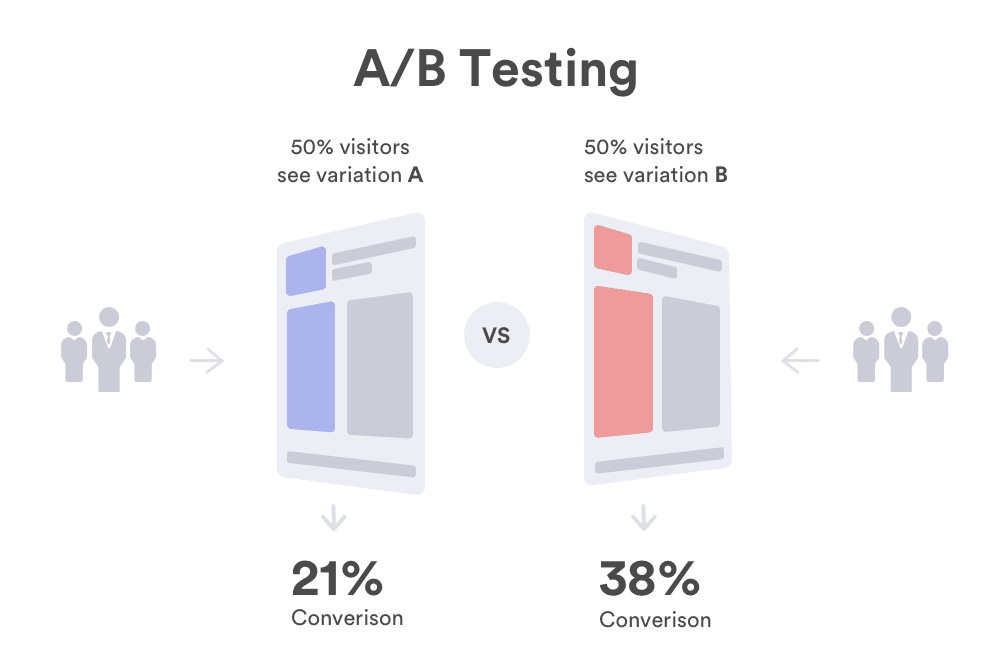
In digital marketing, performance beats opinion every time. A/B testing your ad copy is one of the most reliable ways to uncover what actually drives action — and it’s essential if you want better results from your advertising budget. Whether you’re running Facebook ads, Google search campaigns, or display banners, guessing isn’t a strategy. Data is. At EVpro Marketing, we help businesses turn guesswork into growth with strategic ad copy testing that aligns with your unique goals and target audience. What Is A/B Testing in Ad Copy? A/B testing compares two versions of your ad copy to determine which performs better. One group sees Version A, another sees Version B — and real-world data decides the winner. Effective A/B testing removes the bias and personal opinion from the process and replaces it with hard metrics like CTR (click-through rate), conversion rate, and ROI. It’s not about what sounds good — it’s about what works. You’re not just optimizing copy — you’re learning how your audience thinks, what they respond to, and how to talk to them more effectively. Why A/B Testing Matters A/B testing isn’t just a technical exercise — it’s a strategic advantage. By letting real-world data guide your decisions, you can move from guesswork to precision. The result? Smarter campaigns, stronger messaging, and better outcomes across the board. Higher ROI: Invest more in what works, cut what doesn’t. Deeper Audience Insights: Learn how your customers think and what triggers action. Faster Optimization: Small changes can create big performance improvements. Reduced Wasted Spend: Focus resources on proven messaging. In a crowded market, constant testing is the edge that separates leaders from everyone else. What Elements Should You Test? Not all parts of your ad carry the same weight. Some elements have a much greater impact on whether someone clicks, converts, or scrolls past. Focus your testing efforts where they’ll matter most — the areas that directly shape perception and drive action. Start with the parts of your ad most likely to influence user behavior: Headlines: Different headlines capture different emotions. Descriptions: Try variations in style, tone, and length. CTAs: Test different action words or urgency cues. Value Propositions: Compare offers — discounts vs. free bonuses, for example. Visual Layouts: Even formatting changes can impact performance. Tip: Test only one variable at a time to clearly identify what drives better results. How to Run A Smart A/B Test Running a successful A/B test isn’t just about making changes — it’s about following a clear process that leads to reliable, actionable insights. When done right, each test builds on the last, creating a repeatable system for improving performance over time. Define Your Goal: Know exactly what you’re trying to improve — clicks, leads, conversions, etc. Build Two Variations: Change only one element between A and B. Split Your Audience Evenly: Ensure random exposure for reliable comparison. Run the Test Long Enough: Early results can be misleading; wait for a statistically valid sample size. Analyze Based on Data, Not Opinion: Choose the winner based on measurable outcomes. Repeat and Optimize: Apply the winner, then test the next variable. A/B testing isn’t a one-time event — it’s a continuous cycle of improvement. Recommended A/B Testing Tools The right tools make A/B testing easier, more accurate, and scalable. Whether you’re running search ads, social campaigns, or landing page experiments, these platforms help you execute tests efficiently and gather insights you can trust. Google Ads Experiments (for search and display campaigns) Facebook Ads Manager A/B Tests (for social media ads) Optimizely, VWO, and other independent platforms (for landing pages and broader campaigns) At EVpro Marketing, we tailor the platform and process to fit your specific campaign goals. Common A/B Testing Mistakes to Avoid Even with the right tools and intentions, it’s easy to fall into traps that undermine your results. Avoiding these common mistakes will help ensure your tests stay clear, meaningful, and truly improve your ad performance over time. Testing too many elements at once: You’ll never know what worked. Stopping tests too early: Let the numbers stabilize. Overcomplicating the process: Keep tests simple and focused. Not testing consistently: Markets shift, and what works today might not work next month. By steering clear of these pitfalls, you’ll maximize the effectiveness of each test and make your ad campaigns smarter and more efficient. Why A/B Testing Is a Growth Strategy — Not Just a Tactic Strong marketing isn’t about being lucky — it’s about being disciplined. A/B testing gives you a framework to refine your message, speak your audience’s language, and outperform competitors who rely on guesswork. If you’re not testing, you’re leaving growth on the table.At EVpro Marketing, we believe every ad can (and should) perform better — but only if you’re willing to challenge your assumptions and let data lead. Ready to optimize smarter? Let’s talk.